
BlackBox Network Services
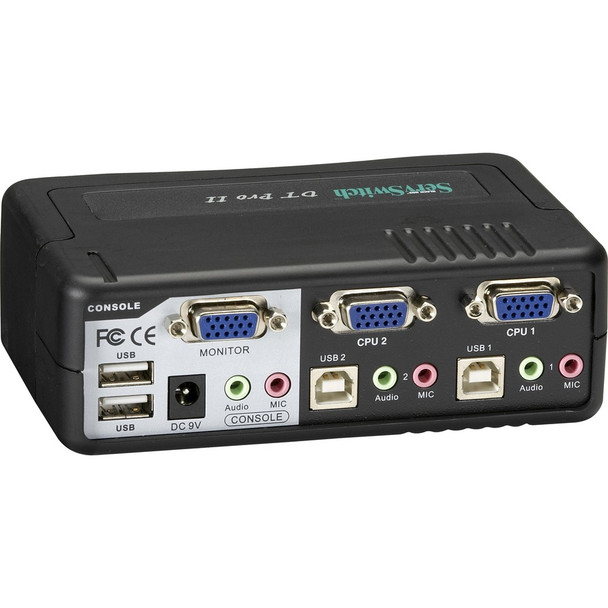
Black Box ServSwitch DT Pro II KVM Switch - 2 x 1 - 2 x HD-15 Video- 1 x Type B Keyboard- 1 x Type B Mouse (KV7020A)
(No reviews yet)
Write a Review
- SKU:
- 18132737
- MPN:
- kv7020a
- Availability:
- Out of stock
- Stock Update:
- 09/28/2026 09:39:15 AM PST


- Stock Update:
- 09/28/2026 09:39:15 AM PST
Frequently bought together:
Description
This item is brand-new, factory sealed.
The ServSwitch DT Pro II KVM Switch provides superior video resolution (up to 1920 x 1440) and crystal-clear audio. Choose from two ways to switch your KVM and CPUs and USB peripherals via front-panel buttons or PC hotkeys. Simply press the front-panel button that corresponds to the CPU you want to switch or use hotkeys to start Autoscan. The Autoscan function enables you to automatically scan and monitor all computers, one by one, that are connected to the DT Pro II.
Features
Environmentally Friendly:
Yes
China
Yes
Country of Origin:
China
Specs
| Physical Characteristics | |
| Weight (Approximate) | 1.80 lb |
| Height | 1.8" |
| Width | 5.4" |
| Depth | 3.5" |
| Warranty | |
| Limited Warranty | 1 Year |
| Interfaces/Ports | |
| Number of PS/2 Ports | 2 |
| PS/2 Port | Yes |
| Video | |
| Maximum Video Resolution | 1920 x 1440 |
| Graphic Mode | SVGA |
| General Information | |
| Brand Name | Black Box |
| Manufacturer Website Address | http://www.blackbox.com |
| Marketing Information | The DT Pro II Desktop KVM Switch supports up to 2 VGA and USB or PS/2 Computers or Servers and allows the user to easily switch between them using keyboard hotkeys or front push buttons. The DT Pro II KVM supports special CPU cables that combine video, K/M, USB, and Audio signals and are available in distances up to 15 feet (EHN7002021). Control and switch multiple PS/2 or USB CPUs and their keyboard, video, mouse, and audio connections with the ServSwitch DT Pro II KVM switch. Link PS/2 KVM to PS/2 CPUs, USB KVM to PS/2 CPUs, PS/2 KVM to USB CPUs, or USB KVM to USB CPUs. Plus, you can connect audio and USB peripherals to the KVM switch. The ServSwitch DT Pro II provides superior video resolution (up to 1920 x 1440) and crystal-clear audio. Choose from two ways to switch your KVM and CPUs and USB peripherals: via front-panel buttons or PC hotkeys. Simply press the front-panel button that corresponds to the CPU you want to switch or use hotkeys to start Autoscan. The Autoscan function enables you to automatically scan and monitor all computers, one by one, that are connected to the DT Pro II. The ServSwitch DT Pro II supports Microsoft® IntelliMouse® and other mice. The unit's USB ports comply with the USB 2.0 standard. What's more, the DT Pro II is compatible with many common operating systems, including Windows 98/Me/XP, Windows 2000, Windows NT, Linux, NetWare, and Mac OS. |
| Product Type | KVM Switchbox |
| Product Name | ServSwitch DT Pro II KVM Switch |
| Manufacturer | Black Box Corporation |
| Manufacturer Part Number | KV7020A |
| Product Series | DT Pro II |
| Product Line | ServSwitch |
| Technical Information | |
| Number of Computers Supported | 2 |
Warranty Information
All Items are Brand New, Factory Sealed and come with a standard warranty. [Read our policies]
View AllClose

Black Box ServSwitch DT Pro II KVM Switch - 2 x 1 - 2 x HD-15 Video- 1 x Type B Keyboard- 1 x Type B Mouse (KV7020A)