
Plustek
Plustek eScan A350 Sheetfed Scanner - 600 dpi Optical 783064638814

- SKU:
- 18173137
- MPN:
- 783064638814
- Availability:
- Out of stock
- Stock Update:
- 02/20/2026 06:11:40 AM PST




- Stock Update:
- 02/20/2026 06:11:40 AM PST
Description
This item is brand-new, factory sealed.
Scan documents directly into network folders, Office 365 and SharePoint without a PC!
Dedicated and Customizable Document Scanning Kiosk
The Plustek eScan optimizes your SharePoint document management by letting you add your metadata directly to the scanned document before saving it into the library. Individual logins and custom preset jobs increase security and efficiency.
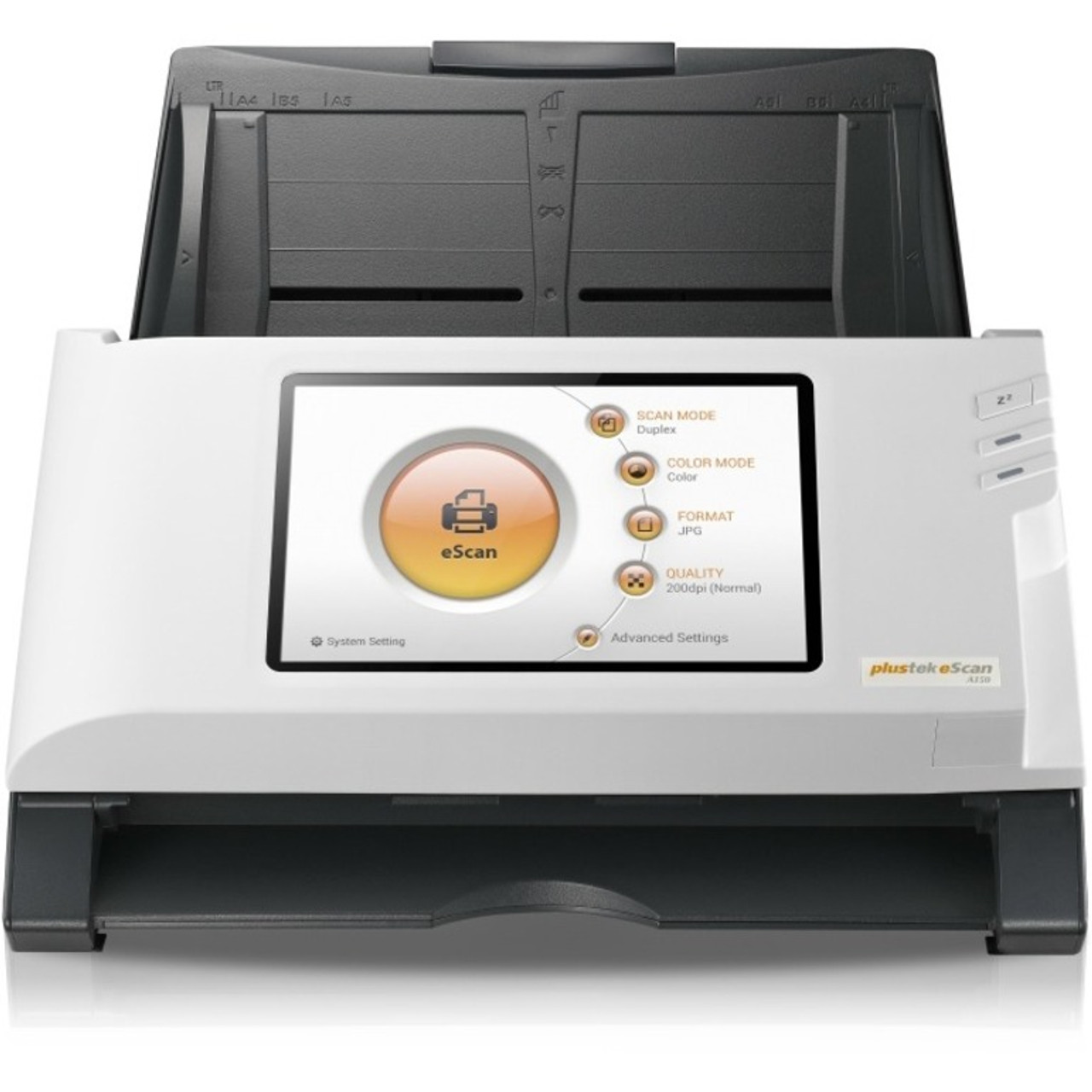
No PC needed! This 30-page per minute all-in-one network scanner includes everything you need and features a 7" touch screen and built in keyboard. It connects to your network via Wi-Fi or Ethernet.
The eScan features a full-color, intuitive interface that makes Microsoft Office365 and SharePoint accessible to everyone without extensive training. No matter what industry you work in, the eScan document-scanning kiosk can be easily integrated into your workflow.
Key Features
- Standalone networkable document scanner
- Scan to Office365, OneDrive, Outlook
- Scan to SharePoint online and on-premise
- Scan to network shared folder (SMB) and Microsoft Azure
- Supports SharePoint document check-in with metadata
- Barcode recognition for file naming
- With 7" touch screen
- Built-in Ethernet and Wi-Fi
Summer 2018 Outstanding Achievement in Innovation Award for: Tight integration with SharePoint, Single-touch scanning to SharePoint and Office 365, robust indexing, allowing new folders to be created on the fly.
Single Touch Jobs
Create Single Touch job buttons to automate repetitive scanning tasks. These programmable job buttons can be setup for different department, different groups and for different tasks. Scanning is as easy as loading your documents and tapping a button. User prompting is configurable to meet your workflow requirements.
Supports Metadata
Supports document check-in and all SharePoint library metadata fields. Users are automatically prompted to enter metadata during document check-in.
Customized Account Settings
Prevent unauthorized access and create unique Single Touch jobs for each user. Unique PIN codes provide an additional level of security.
Remote Management
All scanner settings are configurable remotely using a secure web browser connection.
Features
China
Specs
| Physical Characteristics | |
| Weight (Approximate) | 6.17 lb |
| Height | 7.4" |
| Width | 12.5" |
| Depth | 6.7" |
| Interfaces/Ports | |
| USB | Yes |
| General Information | |
| Brand Name | Plustek |
| Manufacturer Website Address | http://www.plustek.com/usa |
| Marketing Information | Scan documents directly into network folders, Office 365 and SharePoint without a PC! Dedicated and Customizable Document Scanning Kiosk The Plustek eScan optimizes your SharePoint document management by letting you add your metadata directly to the scanned document before saving it into the library. Individual logins and custom preset jobs increase security and efficiency. No PC needed! This 30-page per minute all-in-one network scanner includes everything you need and features a 7" touch screen and built in keyboard. It connects to your network via Wi-Fi or Ethernet. The eScan features a full-color, intuitive interface that makes Microsoft Office365 and SharePoint accessible to everyone without extensive training. No matter what industry you work in, the eScan document-scanning kiosk can be easily integrated into your workflow. Key Features Standalone networkable document scanner Scan to Office365, OneDrive, Outlook Scan to SharePoint online and on-premise Scan to network shared folder (SMB) and Microsoft Azure Supports SharePoint document check-in with metadata Barcode recognition for file naming With 7" touch screen Built-in Ethernet and Wi-Fi Buyers Labs Award Winner Summer 2018 Outstanding Achievement in Innovation Award for: Tight integration with SharePoint, Single-touch scanning to SharePoint and Office 365, robust indexing, allowing new folders to be created on the fly. Single Touch Jobs Create Single Touch job buttons to automate repetitive scanning tasks. These programmable job buttons can be setup for different department, different groups and for different tasks. Scanning is as easy as loading your documents and tapping a button. User prompting is configurable to meet your workflow requirements. Supports Metadata Supports document check-in and all SharePoint library metadata fields. Users are automatically prompted to enter metadata during document check-in. Customized Account Settings Prevent unauthorized access and create unique Single Touch jobs for each user. Unique PIN codes provide an additional level of security. Remote Management All scanner settings are configurable remotely using a secure web browser connection. |
| Product Type | Sheetfed Scanner |
| Product Name | eScan SharePoint A350 Sheetfed Scanner |
| Manufacturer | Plustek, Inc |
| Manufacturer Part Number | 783064638814 |
| Product Model | A350 |
| Product Line | eScan |
| Technical Information | |
| Optical Resolution (dpi) | 600 |
| Maximum Color Scan Speed (ppm) | 25 |
| Maximum Mono Scan Speed (ipm) | 50 |
| Scan Color |
|
| Media Size | Custom Size - 8.50" x 16.67 ft |
| PC Free Scanning | Yes |
| Maximum Mono Scan Speed (ppm) | 25 |
| ADF Capacity | 50 Sheets |
| Maximum Color Scan Speed (ipm) | 50 |
Warranty Information
