Qnap
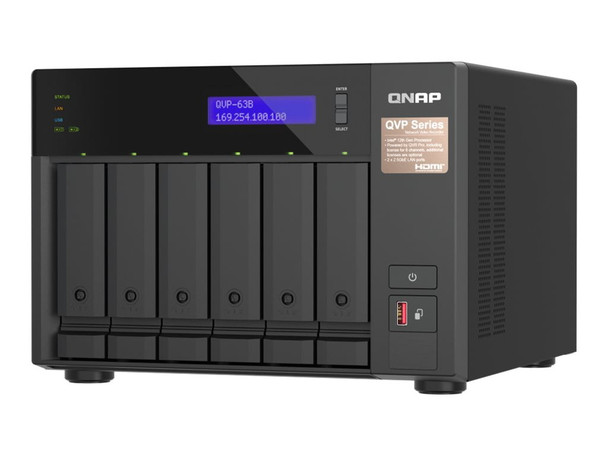
Qnap QVP63BUS 6 Bay Network Video Recorder
- SKU:
- 21378710
- MPN:
- qvp-63b-us
- Availability:
- Usually ships the same or next business day. In stock at our CA warehouse.
- Shipping:
- Calculated at Checkout
- Stock Update:
- 03/24/2026 04:48:28 PM PST



- Stock Update:
- 03/24/2026 04:48:28 PM PST
Description
This item is brand-new, factory sealed.
QNAP 6-Bay NVR NAS Enclosure QVP-63B- Key Features
- 6 x 2.5" / 3.5" SATA III Drive Bays
- 2 x M.2 2280 PCIe 4.0 SSD Slots
- Intel Core i3 Quad-Core CPU
- 16GB DDR4 RAM
- General Features
- Network Connectivity
- The QVP-63B integrates with your network through two 2.5G Ethernet ports.
- High-Speed USB
- One USB-C and two USB-A 3.2 Gen 2 ports are available for connecting 10 Gb/s compatible devices.
- Direct Playback
- Connect a 4096 x 2160 resolution, 30 Hz 4K monitor using the HDMI 1.4b port to view surveillance footage directly from the NAS as though it were a dedicated workstation.
- Upgrade Ready
- Install up to two M.2 NVMe PCIe 4.0 cache drives to boost the performance of your NAS. Additionally, two DDR4 SO-DIMM slots support up to 64GB of memory. Expansions such as an entry level graphics card may be installed into the PCIe 4.0 x16 and x4 slots.
- MP4 Videos
- Videos are saved using the non-proprietary MP4 video format.
- Comprehensive Camera Support
- The QVP-63B supports thousands of camera models from over 190 brands with a variety of image formats (including cameras that use ONVIF and RTSP/ HTTP streaming). Even USB webcams are supported, allowing home and budget-conscious users to quickly build surveillance solutions tailored to their environment while providing convenient camera management.
- Motion Detection with USB Webcams
- The QVP-63B provides motion detection even for entry-level cameras and USB webcams. As long as your camera can stream its footage to the QVR Pro appliance (e.g. through RTSP protocol) it supports motion detection, allowing you to build a budget-friendly, motion-detecting surveillance system.
- QVR Pro
- QVR Pro Desktop Client
- The QVR Pro Client software can be installed on Windows and Mac devices, allowing you to monitor from different platforms and flexibly switch from live view or playback mode to take full control over monitored areas.
- Live View & Playback
- Monitor the live view of multiple channels and play recordings on a single interface. You can also view recordings at a specific time by clicking the timeline or by defining a time range.
- Region of Interest
- The Region of Interest (ROI) feature allows for viewing multiple regional images from the same camera in live view and playback mode. You can define and enlarge multiple areas to watch the area more closely.
- Qdewarp Technology
- Qdewarp enables users to view standard fisheye camera recordings in proportional ratios and sizes without affecting original recordings. The distorted parts on the edges can be turned into a clear panoramic view.
- Multiple Notification Methods
- The event notification provides multiple ways of being informed of emerging events, including flashing red borders of channels, alert buzzers, and the motion icon on the e-map.
- QVR Pro Client Mobile App
- The QVR Pro Client mobile app allows you to remotely monitor multiple channels simultaneously. If your network connection is slow or metered/capped, you can choose the low-bandwidth mode to view a bandwidth-optimized stream without affecting the quality of recordings. In addition, you can remotely set the camera's preset point or control the PTZ cameras within the app.
- Additional Surveillance Applications
- QVR Center
- Centrally manage multiple QVR Pro servers installed in different areas. You can also centrally monitor live feeds, play back recordings, and receive event notifications from multiple QVR Pro servers, helping you reduce response times to events.
- QVR Guard
- Protect QVR Pro from system failure to ensure uninterruptible surveillance recordings. If your QVR Pro fails or crashes, QVR Guard automatically takes over recording tasks, providing dependable redundancy for your surveillance system.
- QVR Face
- Obtain real-time video analytics from connected cameras and use them to set profiles, groups, and event notifications for instant facial recognition. This is ideal for smart retail, door access management, and VIP welcoming systems.
- Product Dimensions: 15 x 12 x 14 inches
- Item Weight: 0.434 ounces
- Manufacturer: QVP-63B-US
Effortlessly construct your surveillance system with the QNAP QVP-63B 6-Bay NVR NAS Enclosure as its core. Equipped with an Intel Core i3 quad-core processor and 16GB of DDR4 memory, simply install your preferred storage drives into the six 2.5" / 3.5" SATA III bays to begin. Configured drives can be set in RAID 0, 1, 5, 6, and 10 modes with hot spare for optimal speed and data redundancy. Eight camera channel licenses are included, expandable up to 32.With support for over 6000 IP cameras and 190 brands, along with compatibility for budget-friendly desktop USB webcams, customize your surveillance to suit your needs and environment. The QNAP QVR Pro client for Windows and Mac enables management of your footage, storage, and applications, supporting live surveillance from client computers and mobile devices.
Specs
| Warranty | |
| Limited Warranty | 3 Year |
| Interfaces/Ports | |
| HDMI | Yes |
| General Information | |
| Brand Name | QNAP |
| Manufacturer Website Address | http://www.qnap.com |
| Marketing Information | QVP-63B vs. other NAS-based surveillance systems. What's the difference? In a conventional NAS-based surveillance system, surveillance is just one of many applications available to users. As all these applications need to share NAS system resources and storage space, surveillance performance could be impacted. The QVP-63B QVR Pro Appliance overcomes this by providing dedicated storage space and reserving full system resources for surveillance, delivering the utmost performance to fulfill professional surveillance system requirements. The QVP-63B also comes with built-in camera channel licenses and essential applications to enable local installation without requiring an internet connection. Simply install the hard drives and power up the QVP-63B to start the installation process. High-capacity video surveillance storage solution QVP-63B is a professional network surveillance server, compatible with 8,000+ IP cameras of 200+ brands and thousands of ONVIF network cameras Comprehensive camera support and management The QVP-63B supports thousands of camera models from over 200+ brands with a variety of image formats (including cameras that use ONVIF and RTSP/ HTTP streaming). Even USB webcams are supported, allowing home and budget-conscious users to quickly build surveillance solutions tailored to their environment while providing convenient camera management. |
| Product Type | Video Surveillance Station |
| Product Name | QVR Pro QVP-63B Video Surveillance Station |
| Manufacturer | QNAP Systems |
| Manufacturer Part Number | QVP-63B-US |
| Product Model | QVP-63B |
| Product Line | QVR Pro |
| Software | |
| Operating System Supported |
|
| Technical Information | |
| System Components | Network Video Recorder |
| Total Number of Channels | 8 |
| Features |
|
| Connectivity Technology | Wired |
Warranty Information