Startech
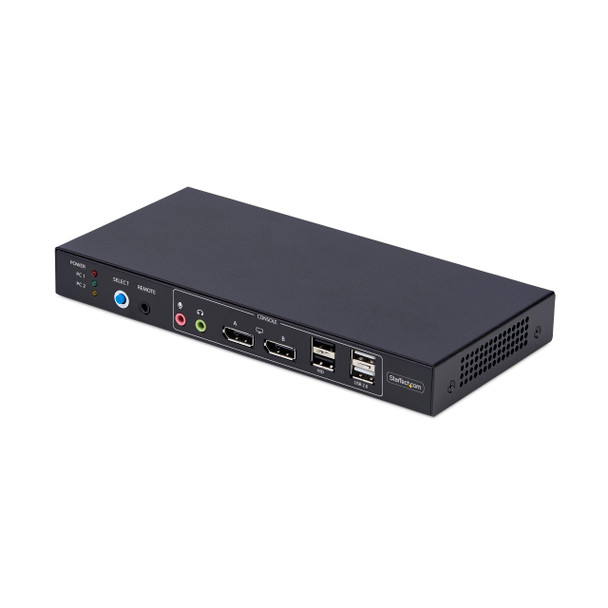
StarTech.com 2-Port Dual-Monitor DisplayPort KVM Switch with Dual View Video Matrix, 4K 60Hz, 4x USB Hub Ports, TAA Compliant (p2add121d-kvm-switch)
- SKU:
- 21083440
- MPN:
- p2add121d-kvm-switch
- Availability:
- Usually ships the same or next business day. In stock at our CA, PA, SC, TX warehouses.
- Shipping:
- Calculated at Checkout
- Stock Update:
- 03/28/2026 03:14:00 PM PST




Bulk discount rates
Below are the available bulk discount rates for each individual item when you purchase a certain amount
| Buy 2 or above | and pay only $386.52 each 386.52 |
- Stock Update:
- 03/28/2026 03:14:00 PM PST
Description
This item is brand-new, factory sealed.
The Video Matrix KVM Switch allows you to view one display from each connected computer and switch the keyboard, mouse, and audio device between the selected displays using hotkeys. You can also switch all connected peripherals and both monitors like a standard KVM.
Universal Compatibility
The TAA-Compliant KVM Switch provides BIOS/UEFI control and works with any operating system, including Windows, macOS, and Linux. No software is required, and it is compatible with all hardware platforms such as Intel, AMD, and Apple Silicon.
Customizable Switching
Switching KVM ports is easy with the front-facing push button, hotkeys, or the included remote selector cable. An audible buzzer provides confirmation, and LEDs offer quick visual port selection status.
Reliable Performance
The durable design features a steel housing that helps prevent Electro-Magnetic Interference (EMI), enhancing the stability and reliability of the KVM. Its sturdy construction makes it ideal for installation in a variety of environments, and it offers 8kV Air/6kV Contact ESD protection.
USB Audio
Eliminate the need to connect 3.5mm cables from the computers to the KVM by using this KVM switch's built-in USB audio device, which provides 3.5mm audio jacks for both microphone and speakers. This setup simplifies your workspace by integrating audio management directly into the KVM switch.
Enhance Productivity and Device Management with the StarTech.com Connectivity Tools Application
Developed to improve performance and security, StarTech.com Connectivity Tools is the only software suite on the market that works with a wide range of IT connectivity accessories. The software suite includes:
- Advanced Windows Layout Utility: Setup and save custom windows layouts.
- USB Event Monitoring Utility: Track and log connected USB devices.
For more information and to download the StarTech.com Connectivity Tools application, please visit: www.startech.com/connectivity-tools
Package Contents:
- KVM Switch
- 1x Remote Selector Cable
- 1x Universal Power Adapter (NA/EU/UK/ANZ)
- 1x Quick-Start Guide
Features
- KVM Switch
- 1x Remote Selector Cable
- 1x Universal Power Adapter (NA/EU/UK/ANZ)
- 1x Quick-Start Guide
TAA Compliant:
Yes
Environmental Compliance:
Restriction of Hazardous Substances (RoHS)
Waste Electrical and Electronic Equipment Directive (WEEE)
Country of Origin:
Taiwan
Specs
| Power Description | |
| Input Voltage Range | 100 - 240 AC |
| Power Plug Type | Type M |
| Input Current | 1 A |
| Physical Characteristics | |
| Weight (Approximate) | 1.38 lb |
| Length | 8.70" |
| Height | 1" |
| Width | 4.1" |
| Warranty | |
| Limited Warranty | 2 Year |
| Interfaces/Ports | |
| Number of USB Ports | 6 |
| Number of DisplayPorts | 6 |
| USB | Yes |
| DisplayPort | Yes |
| USB 2.0 | Yes |
| USB Standard | USB 2.0 |
| Video | |
| Maximum Video Resolution | 3840 x 2160 |
| Graphic Mode | 4K |
| General Information | |
| Brand Name | StarTech.com |
| Manufacturer Website Address | http://www.startech.com |
| Marketing Information | The Video Matrix KVM Switch allows you to view one display from each connected computer and switch the keyboard, mouse, and audio device between the selected displays using hotkeys. You can also switch all connected peripherals and both monitors like a standard KVM. Universal Compatibility The TAA-Compliant KVM Switch provides BIOS/UEFI control and works with any operating system, including Windows, macOS, and Linux. No software is required, and it is compatible with all hardware platforms such as Intel, AMD, and Apple Silicon. Customizable Switching Switching KVM ports is easy with the front-facing push button, hotkeys, or the included remote selector cable. An audible buzzer provides confirmation, and LEDs offer quick visual port selection status. Reliable Performance The durable design features a steel housing that helps prevent Electro-Magnetic Interference (EMI), enhancing the stability and reliability of the KVM. Its sturdy construction makes it ideal for installation in a variety of environments, and it offers 8kV Air/6kV Contact ESD protection. USB Audio Eliminate the need to connect 3.5mm cables from the computers to the KVM by using this KVM switch's built-in USB audio device, which provides 3.5mm audio jacks for both microphone and speakers. This setup simplifies your workspace by integrating audio management directly into the KVM switch. Enhance Productivity and Device Management with the StarTech.com Connectivity Tools Application Developed to improve performance and security, StarTech.com Connectivity Tools is the only software suite on the market that works with a wide range of IT connectivity accessories. The software suite includes: Advanced Windows Layout Utility: Setup and save custom windows layouts. USB Event Monitoring Utility: Track and log connected USB devices. For more information and to download the StarTech.com Connectivity Tools application, please visit: www.startech.com/connectivity-tools |
| Product Type | KVM Switchbox |
| Product Name | KVM Switchbox |
| Manufacturer | StarTech.com |
| Manufacturer Part Number | P2ADD121D-KVM-SWITCH |
| Packaged Quantity | 1 |
| Technical Information | |
| Number of Computers Supported | 2 |
| Features | LED Indicator |
| Connectivity Technology | Wired |
| Environmental Conditions | |
| Maximum Operating Temperature | 104°F (40°C) |
| Minimum Operating Temperature | 32°F (0°C) |
Warranty Information