Tripp Lite
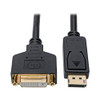
Tripp Lite DisplayPort to DVI Adapter Converter Cable M/F 1080p Black 1ft (P134-001-GC)

- SKU:
- 18170719
- MPN:
- p134-001-gc
- Availability:
- Out of stock
- Stock Update:
- 01/23/2026 12:45:53 PM PST




- Stock Update:
- 01/23/2026 12:45:53 PM PST
Description
This item is brand-new, factory sealed.
Tripp Lite DisplayPort to DVI Cable Adapter (M/F), DP to DVI Adapter, 1080p @ 60 Hz, Black, 1 Ft. (P134-001-GC)- Dp to DVI converter: This DisplayPort to DVI converter connects a DVI monitor or Projector to the DisplayPort (DP) output on your notebook computer, desktop PC, Chromebook Pixel or other compatible device.
- Crystal clear video & audio: This DVI to DisplayPort converter supports DVI-D Single-Link computer video resolutions up to 1920 x 1200 (at 60 Hz) and high-definition resolutions up to 1080p. It also complies with HDCP 2.2 and DisplayPort 1.1 standards
- Compact & easy to use: this compact DVI adapter fits easily into a briefcase or laptop bag for instant use anywhere. No software Downloads or drivers are required, so you can connect your devices and use immediately.
- Passive DisplayPort adapter: This product is a passive adapter and requires that the connected computer has a DP++ (DisplayPort ++) dual-mode port.
- Common applications: display 1080p video on an existing DVI monitor without the expense of buying a new DisplayPort monitor. Ideal for classrooms, lecture halls and anywhere else you may give a presentation.
- 3 year warranty & FREE tech support: This DVI to DP adapter is backed by a 3 year limited warranty, and is supported by free chicago-based tech Support in the event of any issues.
- Product Dimensions: 0.5 x 7 x 9 inches
- Item Weight: 2.08 ounces
Dp to DVI converter Connects a DisplayPort source to your existing DVI display This DisplayPort to DVI converter Connects a DVI monitor or projector to the DisplayPort (DP) output on your notebook computer, desktop PC, chrome book Pixel or other compatible device. It features a male DP connector and a female dual-link DVI-I connector, allowing you to continue using your existing DVI display and DVI cable to transmit video signals without the expense of a new DP display. Transmits outstanding 1080p video for high-definition presentations ideal for classrooms, lecture halls and anywhere else you may give a presentation, this DisplayPort to DVI converter supports DVI-D Single-Link computer video resolutions up to 1920 x 1200 (at 60 Hz) and high-definition resolutions up to 1080p. It also complies with HDCP 2.2 and DisplayPort 1.1 standards. Molded gold-plated connectors and contacts provide maximum conductivity and minimum data loss to guarantee a clear transmission free of interference. The p134-001-gc is a passive adapter and requires that the connected computer has a DP++ ( DisplayPort ++ ) port, which allows DVI signals to be passed through. Check the documentation for your DisplayPort source for compatibility. Ready to use right out of the package The plug-and-play adapter Requires no software, drivers or external power, so you can connect it to your devices right away. Only one foot in length, the p134-001-gc is recommended for stowing in your laptop bag and carrying to school, the office or the latest trade show.
Features
Yes
Environmental Compliance:
Registration, Evaluation, Authorization and Restriction of Chemicals (REACH)
Restriction of Hazardous Substances (RoHS)
Country of Origin:
China
Specs
| Physical Characteristics | |
| Weight (Approximate) | 0.13 lb |
| Product Color | Black |
| Color Family | Black |
| Shipping Weight (Approximate) | 2.08 oz |
| Shipping Width | 7" |
| Shipping Height | 9" |
| Warranty | |
| Limited Warranty | 3 Year |
| General Information | |
| Brand Name | Tripp Lite series |
| Manufacturer Website Address | http://www.eaton.com |
| Marketing Information | DP to DVI Converter Connects a DisplayPort Source to Your Existing DVI Display This DisplayPort to DVI converter connects a DVI monitor or projector to the DisplayPort (DP) output on your notebook computer, desktop PC, Chromebook Pixel or other compatible device. It features a male DP connector and a female dual-link DVI-I connector, allowing you to continue using your existing DVI display and DVI cable to transmit video signals without the expense of a new DP display. Transmits Outstanding 1080p Video for High-Definition Presentations Ideal for classrooms, lecture halls and anywhere else you may give a presentation, this DisplayPort to DVI converter supports DVI-D single-link computer video resolutions up to 1920 x 1200 (at 60 Hz) and high-definition resolutions up to 1080p. It also complies with HDCP 2.2 and DisplayPort 1.1 standards. Molded gold-plated connectors and contacts provide maximum conductivity and minimum data loss to guarantee a clear transmission free of interference. The P134-001-GC is a passive adapter and requires that the connected computer has a DP++ ( DisplayPort ++ ) port, which allows DVI signals to be passed through. Check the documentation for your DisplayPort source for compatibility. Ready to Use Right Out of the Package The plug-and-play adapter requires no software, drivers or external power, so you can connect it to your devices right away. Only one foot in length, the P134-001-GC is recommended for stowing in your laptop bag and carrying to school, the office or the latest trade show. More from the Manufacturer |
| Product Type | Video Cable |
| Product Name | P134-001-GC DisplayPort to DVI Cable Adapter - M/F, Black, 1 ft. |
| Manufacturer | Eaton Corporation |
| Manufacturer Part Number | P134001GC |
| Product Model | P134-001-GC |
| Technical Information | |
| Connector on Second End Details | 1 x DVI-I (Dual-Link) Digital Video - Female |
| Connector Plating | Gold |
| Supported Resolution | 1920 x 1200 |
| Cable Type | DisplayPort/DVI-I |
| Connector on First End Details | 1 x DisplayPort Digital Audio/Video - Male |
| Connector Type on First End | DisplayPort Digital Audio/Video - Male |
| Connector Type on Second End | DVI-I (Dual-Link) Digital Video - Female |
| Contact Plating | Gold |
| Cable Length | 1 ft |
| Features |
|
| Device Supported |
|
Warranty Information