
Hewlett Packard
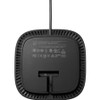
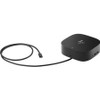
HP USB-C Dock G5 Essential Dock 72C71AA#ABA

- SKU:
- 19293406
- MPN:
- 72c71aa-aba
- Availability:
- Usually ships the same or next business day. In stock at our CA, IL, PA warehouses.
- Shipping:
- Calculated at Checkout
- Stock Update:
- 01/16/2026 09:13:12 PM PST


Bulk discount rates
Below are the available bulk discount rates for each individual item when you purchase a certain amount
| Buy 2 - 3 | and pay only $176.67 each 176.67 |
| Buy 4 or above | and pay only $169.47 each 169.47 |
- Stock Update:
- 01/16/2026 09:13:12 PM PST
Description
This item is brand-new, factory sealed.
Have everything you need to get the job done with this compact dock that keeps your desk clean. With a single USB-C® cable,open your ports to all your accessories, connect up to three high-res displays stable Ethernet connection, and so much more...all while charging your laptop Clear your desk and clear your mind with this HP USB-C G5 Essential Dock.Seamless Productivity
Effortlessly go the extra mile with just a single USB-C® cable This essential dock seamlessly powers and supports 4 USB-A ports for all your accessories, up to 3 high-res displays and stable Ethernet connection-all while delivering 65W of power to your laptop.
Simple Setup. Essential Manageability.
Just plug in the dock and get down to business. It's simple to stay up to date with essential manageability features including connected firmware updates, PXE boot, LAN/WLAN switching, and more.
More Ports, Less Constraints
This essential dock is designed to work with what you're working with t's compatible with most USB-C® or Thunderbolt™ enabled PCs and its various ports open the way to all your accessories.
Compact Meets Impact
Reclaim your desk and clear the clutter with a compact dock that takes up less than 5 x 5 inches of space. With a single cable connection, less is more.
More ports, less constraintsDesigned to work with what you're working with. It's compatible with most USB-C® or Thunderbolt™ enabled PCs, and its various ports open the way to all your accessories.
Simple setup. Essential Manageability.Just plug in the dock and get down to business. It's simple to stay up to date with essential manageability features including connected firmware updates, PXE boot, LAN/WLAN switching, and more.
Compact meets impactReclaim your desk and clear the clutter with a compact dock that takes up less than 5 x 5 inches of space. With a single cable connection, less is more.
Package Contents:
- USB-C G5 Essential Dock
- 120 W Power Adapter
- AC Power Cord
- Quick Setup Poster
- Warranty Card
Features
- USB-C G5 Essential Dock
- 120 W Power Adapter
- AC Power Cord
- Quick Setup Poster
- Warranty Card
Compatibility:
Compatible Devices:
- G8/G9 HP Notebooks
- Apple MacBook Air Retina 2020
- Google Pixelbook Go
- Google Pixlebook Go 2
- Apple MacBook Pro M1 2020
- MacBook Air M1 2020
- Dell Latitude 7420
Brand Compatibility:
HP
Google
Apple
Dell
Specs
| Power Description | |
| Maximum Power Supply Wattage | 120 W |
| Power Source Type | Power Adapter |
| Physical Characteristics | |
| Weight (Approximate) | 1.49 lb |
| Product Color | Black |
| Height | 4.80" |
| Color Family | Black |
| Width | 1.77" |
| Depth | 4.80" |
| Warranty | |
| Limited Warranty | 1 Year |
| Interfaces/Ports | |
| Number of USB Type-A Ports | 4 |
| USB Type-C Detail | 1 x 120W USB-C Power Delivery |
| Number of DisplayPort Outputs | 1 |
| Number of HDMI Outputs | 1 |
| Number of RJ-45 Ports | 1 |
| Number of USB Type-C Ports | 1 |
| USB Type-C | Yes |
| Headphone/Microphone Combo Port | Yes |
| Network (RJ-45) | Yes |
| Number of DisplayPorts | 1 |
| Number of HDMI Ports | 1 |
| Host Interface | USB Type C |
| DisplayPort | Yes |
| USB Type-A | Yes |
| HDMI | Yes |
| General Information | |
| Brand Name | HP |
| Manufacturer Website Address | http://www.hp.com |
| Marketing Information | Have everything you need to get the job done with this compact dock that keeps your desk clean. With a single USB-C® cable,open your ports to all your accessories, connect up to three high-res displays stable Ethernet connection, and so much more...all while charging your laptop Clear your desk and clear your mind with this HP USB-C G5 Essential Dock. Seamless Productivity Effortlessly go the extra mile with just a single USB-C® cable This essential dock seamlessly powers and supports 4 USB-A ports for all your accessories, up to 3 high-res displays and stable Ethernet connection-all while delivering 120W of power to your laptop. Simple Setup. Essential Manageability. Just plug in the dock and get down to business. It's simple to stay up to date with essential manageability features including connected firmware updates, PXE boot, LAN/WLAN switching, and more. More Ports, Less Constraints This essential dock is designed to work with what you're working with t's compatible with most USB-C® or Thunderbolt™ enabled PCs and its various ports open the way to all your accessories. Compact Meets Impact Reclaim your desk and clear the clutter with a compact dock that takes up less than 5 x 5 inches of space. With a single cable connection, less is more. More ports, less constraints Designed to work with what you're working with. It's compatible with most USB-C® or Thunderbolt™ enabled PCs, and its various ports open the way to all your accessories. Simple setup. Essential Manageability. Just plug in the dock and get down to business. It's simple to stay up to date with essential manageability features including connected firmware updates, PXE boot, LAN/WLAN switching, and more. Compact meets impact Reclaim your desk and clear the clutter with a compact dock that takes up less than 5 x 5 inches of space. With a single cable connection, less is more. |
| Product Type | Docking Station |
| Product Name | USB-C Dock G5 Essential Dock |
| Manufacturer | HP Inc. |
| Manufacturer Part Number | 72C71AA#ABA |
| Network & Communication | |
| Ethernet Technology | Ethernet |
| Software | |
| Operating System Supported |
|
| Technical Information | |
| Number of Displays Supported | 3 |
| Device Supported |
|
| Connectivity Technology | Wired |
Warranty Information
