
Huddlecam
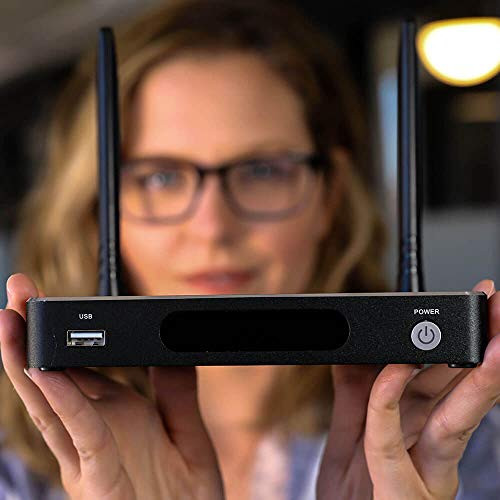
HuddleCamHD HuddleShare HC-HUDDLESHARE IEEE 802.11ac Wireless Presentation Gateway (huddlecamhdhuddleshare)
- SKU:
- 19192379
- MPN:
- huddlecamhdhuddleshare
- Availability:
- Usually ships in 2-3 business days. In stock at our CA warehouse.
- Shipping:
- Calculated at Checkout
- Stock Update:
- 12/15/2025 02:00:54 PM PST

- Stock Update:
- 12/15/2025 02:00:54 PM PST
Description
This item is brand-new, factory sealed.
HuddleCamHD HuddleShare Wireless Content Sharing Device- Support in-room dedicated computers and HDMI video inputs with the smart auto-switching feature.
- Connect the HuddleShare via HDMI to your television with embedded audio support for wireless content sharing.
- The HuddleShare can be connected to your local area network via WiFi or ethernet as well. Presentation server wireless.
- There is also wireless transmission. Easily add wireless connectivity and support traditional HDMI video
- Connect a Wireless Keyboard and Mouse to the HuddleShare for extended computer control.
- Brand Name: HuddleCamHD
- Item Weight: 2.25 pounds
- Package Dimensions: 9.02 x 7.64 x 2.4 inches
- Item model number: HC-HUDDLESHARE
- Color Name: Black
The HuddleShare is a hassle-free wireless content sharing device that has been designed to support the needs of the modern conference room. Easily share your ideas and content securely from any Mac, PC, Android, or iOS devices directly to any meeting room projector or LCD display with HDMI. The HuddleShare has been designed to provide a seamless user experience across every meeting room in your company. In the BYOD, Bring Your Own Device, conferencing space, the HuddleShare provides a seamless wireless content sharing solution that satisfies all users. Forget about installing expensive audiovisual cabling and leverage the affordable HuddleShare wireless content system. If your room already has an HDMI input or dedicated computer you can use the HDMI auto-switching feature to easily add wireless connectivity to your room with connectivity options for an installed HDMI input or meeting room computer. Easily add wireless connectivity and support traditional HDMI video inputs you already have in place. This device is perfect for your conference room. The conference room projector is best for every business and is a good addition as a conference room projector. The wireless content sharing procedures help promote wireless sharing and wireless transmission in the conference room. The Presentation Server Wireless is your go-to option here. Designed to support iOS and Android Smart Phone devices, users can quickly access the app by scanning the on-screen QR codes. Allow audio to flow into your room in integration friendly methods. Connect the HuddleShare to an in-room audio system via the 3.5mm audio output. Configure the Huddle Share to provide secure guest WiFi access with or without internet access. Connect a Wireless Keyboard and Mouse to the HuddleShare for extended computer control. Plus, use any Smartphone with the included app as a mouse as well! You can get this device for you to get the best apps inside your office space.
Package Contents:
- BYOD Wireless Presentation System
- 12V/2.0A DC Power Adapter
- International Plug Adapters
- 2 x Antennas
- Quick Start Guide
- ShareKey USB 3.0 Dongle
Features
- BYOD Wireless Presentation System
- 12V/2.0A DC Power Adapter
- International Plug Adapters
- 2 x Antennas
- Quick Start Guide
- ShareKey USB 3.0 Dongle
Specs
| Power Description | |
| Power Consumption | 10 W |
| Physical Characteristics | |
| Form Factor | Desktop |
| Weight (Approximate) | 6.40 oz |
| Height | 0.6" |
| Width | 5.5" |
| Depth | 3.7" |
| Warranty | |
| Limited Warranty | 2 Year |
| Interfaces/Ports | |
| USB | Yes |
| HDMI | Yes |
| General Information | |
| Brand Name | HuddleCamHD |
| Manufacturer Website Address | http://www.haverford.com |
| Marketing Information | Wireless Presentation Solution The HuddleShare is a hassle-free wireless content sharing device that has been designed to support the needs of the modern conference room. Easily share your ideas and content securely from any Mac, PC, Android, or iOS devices directly to any meeting room projector or LCD display with HDMI. Seamless Wireless Content Sharing The HuddleShare has been designed to provide a seamless user experience across every meeting room in your company. In the BYOD, Bring Your Own Device, conferencing space, the HuddleShare provides a seamless wireless content sharing solution that satisfies all users. Forget about installing expensive audiovisual cabling and leverage the affordable HuddleShare wireless content system. If your room already has an HDMI input or dedicated computer you can use the HDMI auto-switching feature to easily add wireless connectivity to your room with connectivity options for an installed HDMI input or meeting room computer. For Meetings That Matter Easy Setup. The only cable you need is HDMI to connect your HuddleShare to your display. The HuddleShare can connect to your network through both wired and wireless connection options. Software is easily installed from the unit in seconds. No need to search for a proprietary connector or spending large amounts of time before the meeting. Smartphones can quickly download the wireless sharing app for iOS or Android using the QR codes on the dashboard display. Collaborate - share presentations, movies, pictures, spreadsheets, and word documents, with powerful whiteboarding and annotation features that allow real-time team-based content collaboration. If you have a touch screen you can connect it to the HuddleShare to enable touch control of any connected PC computer. When the presentation is over, your notes can easily be saved and distributed among meeting participants. High Definition 2 Year Warranty Collaboration Simple Use Full 1080p Video Universal Compatibility |
| Product Type | Wireless Presentation Gateway |
| Product Name | BYOD Wireless Presentation System |
| Manufacturer | Haverford Systems, Inc |
| Manufacturer Part Number | HC-HUDDLESHARE |
| Product Model | HC-HUDDLESHARE |
| Product Line | HuddleShare |
| Technical Information | |
| Wireless LAN Standard | IEEE 802.11ac |
| Total Number of Antennas | 2 |
| Frequency Band |
|
| Number of External Antennas | 2 |
Warranty Information
