
OWC
OWC OWCTB4DKG11P Thunderbolt Go Dock 11-Port

- SKU:
- 20014845
- MPN:
- owctb4dkg11p
- Availability:
- Usually ships the same or next business day. In stock at our TX warehouse.
- Shipping:
- Calculated at Checkout
- Stock Update:
- 09/23/2026 12:08:06 AM PST




- Stock Update:
- 09/23/2026 12:08:06 AM PST
Description
This item is brand-new, factory sealed.
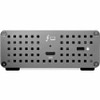
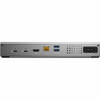
OWC Thunderbolt Go Dock, 11 Ports, Built in Power Supply, 90W Charging, Compatible with Thunderbolt and USB-C Macs, PCs, iPads, Chromebooks, and Android Devices, OWCTB4DKG11P- CONNECT: Add all the external storage, multiple displays, and accessories you need with (3) Thunderbolt 4 ports, (3) USB-A ports, and (1) USB-C port; One dock that works with all your Thunderbolt and USB-C devices.
- Go Easier: Built-in power supply eliminates heavy power brick hassle while enabling more workflows vs bus-powered docks; Go Everywhere:Enjoy mobile connectivity with a rugged, solid aluminum heat-dissipating fanless design.
- Go Faster: Enhance network-based workflows and transfer files up to 2.5x faster than standard 1GbE.
- Go Energized: Keep your notebook travel ready with up to 90W charging power; Go Manage: Rest assured you can keep your devices managed with Go Docks MDM compatibility.
- 2 Year OWC Limited Warranty
- Package Dimensions: 11.89 x 5.87 x 3.78 inches
- Item Weight: 3.01 pounds
Connect everything you want everywhere you call a workspace easily with the OWC Thunderbolt Go Dock. Simply plug the power cable of this worlds first full-featured Thunderbolt dock with a built-in power supply into a standard outlet in coffee shops, airports, vehicles, video production carts, and more to put 11 ports of connectivity empowerment at your fingertips. Tap into high-performance storage capacity including NVMe solutions. Record and livestream with an A/V mixer. Expand your capabilities with a PCIe expansion enclosure. Enjoy the feel of your favorite keyboard and mouse. Nearly any connectivity need you have or want is possible with a diversity of Thunderbolt and USB ports.As a digital nomad, hybrid employee, or creative production pro, you need to be able to expand your notebooks single display imagine TWO 4K displays for maximum productivity at a temporary work location. With the Thunderbolt Go Docks HDMI port and Thunderbolt technology, you can view more detail and make edits easier on a single 8K display. Edit large format video on one 4K display while previewing the raw playback on a second 4K display. Whatever your workstation display needs, the Thunderbolt Go Dock gives you the vision to go to a higher level.Its a hassle trying to figure out or remember what interface your gear and computer has so you can use it all with a dock. Whether you have a Thunderbolt or USB-C Mac, PC, iPad, Chromebook, or Android device, the Thunderbolt Go Docks uplink port utilizes a USB-C connector to give you a multi-connectivity?solution for millions of past, present, and future (yes even USB4!) computers and devices.
Package Contents:
- Docking Station
- 1 x 0.7M (28") Thunderbolt 4 Cable
- 1 x Quick Start Guide for OWC Thunderbolt Go Dock (digital)
- 1 x OWC Dock Ejector for Mac and Windows (digital download)
- 1 x User Guide for OWC Dock Ejector (digital)
Features
- Docking Station
- 1 x 0.7M (28") Thunderbolt 4 Cable
- 1 x Quick Start Guide for OWC Thunderbolt Go Dock (digital)
- 1 x OWC Dock Ejector for Mac and Windows (digital download)
- 1 x User Guide for OWC Dock Ejector (digital)
TAA Compliant:
Yes
Environmentally Friendly:
Yes
Compatibility:
Compatible Devices:
- Apple MacBook Pro (14-inch, Early 2023)
- MacBook Pro (16-inch, Early 2023)
- MacBook Pro (13-inch, Mid 2022)
- MacBook Pro (14-inch, Late 2021)
- MacBook Pro (16-inch, Late 2021)
- MacBook Pro (Touch, 13-inch, Late 2020)
- MacBook Pro (Touch, 13-inch, Mid 2020)
- MacBook Pro (Touch, 16-inch, Mid 2019)
- MacBook Pro (Touch, 13-inch, Mid 2019)
- MacBook Pro (Touch, 15-inch, Mid 2019)
- MacBook Pro (Touch, 15-inch, Late 2018)
- MacBook Pro (Touch, 13-inch, Mid 2018)
- MacBook Pro (Touch, 15-inch, Mid 2018)
- MacBook Pro (Touch, 15-inch, Mid 2017)
- MacBook Pro (Touch, 13-inch, Mid 2017)
- MacBook Pro (Retina, 13-inch, Mid 2017)
- MacBook Pro (Retina, Touch Bar, 15-inch, Late 2016)
- MacBook Pro (Retina, Touch Bar, 13-inch, Late 2016)
- MacBook Pro (Retina, 13-inch, Late 2016)
- MacBook Pro (Retina, 15-inch, Mid 2015)
- Chromebooks
- Android Devices
- iPads
- Intel Evo Laptops
https://eshop.macsales.com/item/OWC/TB4DKG11P/
Environmental Compliance:
Restriction of Hazardous Substances (RoHS)
Registration, Evaluation, Authorization and Restriction of Chemicals (REACH)
Kensington Security Slot:
Yes
Brand Compatibility:
Intel
Apple
Country of Origin:
Taiwan
Specs
| Power Description | |
| Maximum Power Supply Wattage | 120 W |
| Input Voltage Detail |
|
| Power Source Type | Power Supply |
| Physical Characteristics | |
| Weight (Approximate) | 2.09 lb |
| Product Color | Space Gray |
| Height | 1.42" |
| Color Family | Gray |
| Width | 3.62" |
| Warranty | |
| Limited Warranty | 2 Year |
| Interfaces/Ports | |
| USB Power Delivery | 90W |
| Number of USB Type-A Ports | 3 |
| USB Type-C Detail | 1 x USB 3.2 Gen 2 Type-C Port up to 10Gb/s (1250MB/s) - USB 2.0/3.0 backwards compatible |
| Number of RJ-45 Ports | 1 |
| Number of Thunderbolt 4 Ports | 2 |
| Audio Line Out | Yes |
| Number of USB Type-C Ports | 1 |
| Number of USB 2.0 Ports | 1 |
| Total Number of USB Ports | 4 |
| Thunderbolt Ports Quantity | 3 |
| Number of USB 3.2 Gen 2 Type-A Ports | 2 |
| USB Type-C | Yes |
| Network (RJ-45) | Yes |
| HDMI Version | 2.1 |
| Number of HDMI Ports | 1 |
| Host Interface | Thunderbolt 4 |
| USB Type-A | Yes |
| HDMI | Yes |
| Thunderbolt | Yes |
| Number of Network (RJ-45) Ports | 1 |
| General Information | |
| Brand Name | OWC |
| Manufacturer Website Address | https://www.owc.com/ |
| Marketing Information | Everything. Everywhere. Easier. While life is often full of compromises, your dock shouldn't be. You should be able to move your workflow from the desktop to the road easily on short notice without having to choose what device or accessory to leave behind. Connect everything you want everywhere you call a workspace easily with the OWC Thunderbolt Go Dock. Say goodbye to a heavy, bulky power adapter slowing you down. Or a bus-powered mini dock not having the complete ports you need. Simply plug the power cable of this world's first full-featured Thunderbolt dock with a built-in power supply into a standard outlet in coffee shops, airports, vehicles, video production carts, and more to put 11 ports of connectivity empowerment at your fingertips. Go Easier Built-in power supply eliminates heavy power brick hassle while enabling more workflows vs bus-powered docks. Go Connect Add all the external storage, multiple displays, and accessories you need with (3) Thunderbolt 4 ports, (3) USB-A ports, and (1) USB-C port. Go Everything One dock that works with all your Thunderbolt and USB-C devices. Go Faster Enhance network-based workflows and transfer files up to 2.5x faster than standard 1GbE. Go Energized Keep your notebook travel ready with up to 90W charging power. Go Everywhere Enjoy mobile connectivity with a rugged, solid aluminum heat-dissipating fanless design. Go Managed Rest assured you can keep your devices managed with Go Dock's MDM compatibility. Go Connect It All Get ahead at work and play by connecting an incredible array of past, present, and future Thunderbolt and USB devices and accessories to the Thunderbolt Go Dock. Tap into high-performance storage capacity including NVMe solutions. Record and livestream with an A/V mixer. Expand your capabilities with a PCIe expansion enclosure. Enjoy the feel of your favorite keyboard and mouse. Nearly any connectivity need you have or want is possible with a diversity of Thunderbolt and USB ports. Charge your laptop Connect one 8K / up to two 4K monitors Connect portable SSD storage Connect large desktop RAID storage Add an extra Thunderbolt port Connect / charge USB drives, accessories and devices Connect to IP based workflows / wired networks Connect a digital audio interface Read + Write SD Cards Connect two Thunderbolt daisy-chains More from the Manufacturer |
| Product Type | Docking Station |
| Product Name | Docking Station |
| Manufacturer | Other World Computing |
| Manufacturer Part Number | OWCTB4DKG11P |
| Packaged Quantity | 1 |
| Network & Communication | |
| Ethernet Technology | 2.5 Gigabit Ethernet |
| Software | |
| Operating System Supported |
|
| Technical Information | |
| Charging Capability | Yes |
| Number of Displays Supported | 2 |
| Screen Mode Supported |
|
| Maximum Data Transfer Rate | 5 GB/s |
| Features | Power Delivery Pass-through |
| Supported Resolutions |
|
| Device Supported |
|
| Memory Card Reader | Yes |
| Memory Card Supported | SD |
| Connectivity Technology | Wired |
Warranty Information
